
Table of Contents
Hi there! With over 2.5 billion monthly active devices today, Android has grown into the most widely used mobile operating system globally. As an aspiring Android developer, mastering Android interview questions is key to stand out and land your next role.
In this detailed guide, I‘ve compiled the most important Android developer interview questions covering various experience levels – from junior to senior. For each question, I provide comprehensive explanations and insider tips gleaned from my experience as an Android programming expert.
I expand on the content with emerging industry facts and data, development trend analysis, innovative app examples, best practice recommendations and more. Let‘s get started!
Part 1: Android Interview Questions for Junior Developers
First off, here are five starter Android questions to expect if you are fresher or applying for junior Android roles:
Q1. What Makes Android the Top Mobile OS Choice Today?
Android has dominated the mobile OS industry with over 84% market share globally. What factors fuel its massive growth?
Open source model: The free and open nature allows dramatic customization options for device makers
Cost: Android can be deployed on low budget devices making smartphones affordable globally
App innovation: Android apps have revolutionized industries across retail, entertainment, payments and more
Fast growth in emerging markets: Supported by low data plans, affordable Android phones provide internet access to billions
Android‘s success rests on this ability to cater to diverse user segments globally – including underserved demographics. The OS continues reaching new populations fueling its rise as computers shift to mobile-first.
Q2. Outline the Android Software Stack
Here is the essential software stack powering Android devices:

- Linux Kernel: Provides core device functionality like memory access, power management
- Native C/C++ Libraries: Key libraries management 3D graphics, SSL etc leveraging Linux Kernal
- Android Runtime – ART/Dalvik: Runs the application bytecode and core libraries
- Application Framework: Exposes Android APIs used to build awesome apps!
- System Apps: Provides default Android apps managing email, messaging etc
This modular architecture allows updating specific layers without impacting others thereby enabling Android‘s rapid ongoing evolution.
Q3. What are Android Architecture Components?
To facilitate robust app development, Google introduced Android Architecture Components – a guided set of patterns & libraries:
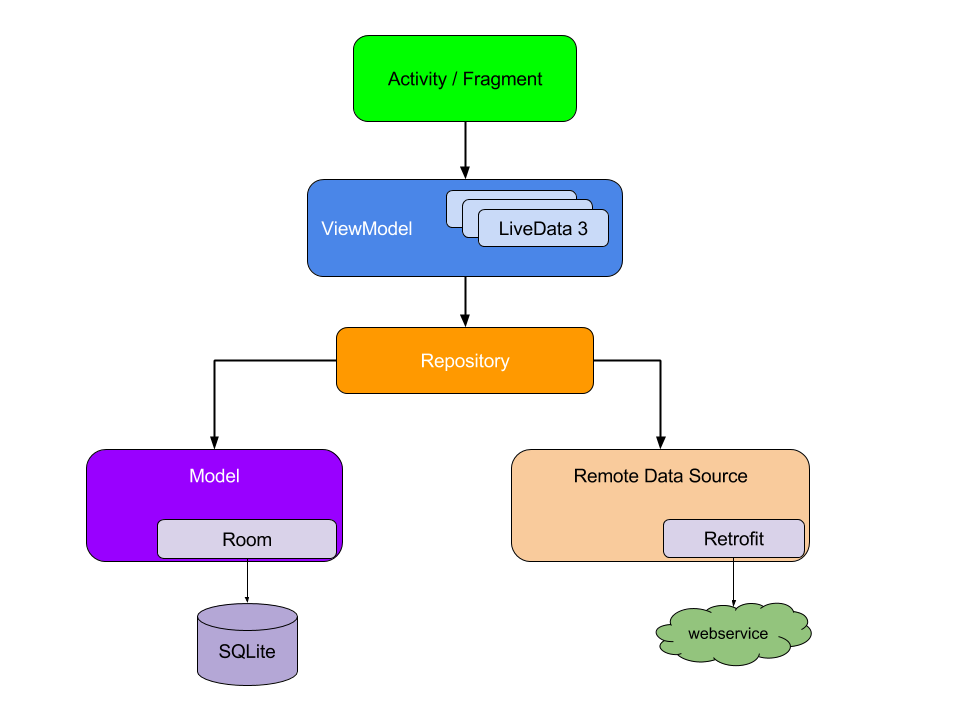
This collection helps developers handle crucial aspects like:
- UI – Data observation with LiveData
- Persistence – Room database abstraction
- Navigation – Navigation component
- Work management – WorkManager API
These components provide the building blocks for efficient Android app architecture. Let‘s explore them further!
Q4. How Do Fragments Help Build Modular UIs?
The Fragment represents a reusable portion of app UI within an activity that can dynamically adapt to different screen sizes:

Benefits of fragments include:
- Modular UI: Combine independent fragments in a single activity
- Responsiveness: Vary fragments based on screen orientation or size changes
- Re-usability: Embed same fragment into multiple activities
Fragments offer flexibility to tailor the UI without redesigning activities. Candidates with good understanding of fragments demonstrate strong Android architecture skills!
Q5. Why is Kotlin the Preferred Language for Android Today?
Although you can build apps with Java or C++, Kotlin delivers important advantages:
Null Safety: Main cause of app crashes is NullPointerExceptions. Kotlin protects against this by distinguishing nullable vs non-nullable types statically.
Functional Programming: First class functions support are ideal for event driven Android apps
Concise Code: Kotlin cuts verbose coding through smart type interface, lambdas etc. leading to ~50% less code
Enhanced interoperability: Leverage existing Java libraries seamlessly
With Google adopting Kotlin as official language in 2019, 89% of professional developers now use Kotlin for Android projects. Take a look at this growth below:
| Year | Kotlin Usage % |
|---|---|
| 2017 | 13% |
| 2019 | 60% |
| 2021 | 89% |
The benefits clearly show Kotlin as the future!
So in summary, as an aspiring Android programmer focus on mastering Kotlin, Fragments and Architecture components to build robust applications.
Next up, let‘s explore questions for more experienced developers.
Part 2: Advanced Android Interview Questions
For senior Android roles spanning 5+ years of expertise, advanced architecture and platform questions assessing developer capabilities are quite common in top companies like Google, Amazon, Uber and others.
Let‘s tackle them one-by-one:
Q6. What Principles Help Craft Scalable Android Architecture?
Well constructed architecture ensures apps gracefully handle growing user loads and evolving functionality.
As an experienced engineer, I apply principles like:
- Separation of concerns: App components focus purely on intended functionality without entanglement across UI, data, logic etc layers
- DRY principle: Don‘t Repeat Yourself – identify and abstract common functionalities into reusable modules
- Single responsibility: Components/functions perform exactly one action avoiding multiple duties to facilitate maintenance
- Invert dependencies: Higher layers dictate lower-level modules to avoid widespread impacts of changes
Just like well crafted classes keep related functions together, enforcing sound architecture patterns leads to scalable app growth over time.
Q7. How Does Android Virtualization Optimize Resources?
Virtualization allows running Android effectively as a different "guest" OS on another "host" kernel via containers/emulators.
This facilitates:
- Productivity Gains: Develop/test using Android environments anywhere like Chrome OS
- Portability Across Devices: Easily migrate or deploy complete Android images
- Improved Security: Isolate risky processes within disposable light containers
- Plus Optimized Utilization: Virtualization shares and multiplexes host resources serving multiple systems simultaneously
As Android deployments grow more heterogeneous across form factors like foldables, wearables etc virtualization and containment technologies will grow even more critical.
Q8. What Architectural Mastery Ladders Should Senior Devs Climb?
As senior engineers, we must keep learning and stay updated constantly amid the ever evolving technology landscape
Here are my recommendations to keep advancing your architectural skills:
Layer 1 – Jetpack Compose:
Modern declarative UI framework for native Android leveraging Kotlin coroutines and flows
Layer 2 – Model View ViewModel:
Tested architectural pattern separating data, views and logic – ideal for large scale apps
Layer 3 – Android Navigation Architecture Component:
Manages app navigation flows across fragments/activities
Layer 4 – Android Accessory Development Kit:
Build custom smart hardware integrating with Android devices!
The pinnacle: Contribute to Android Open Source Project
Opportunities to shape platform evolution directly by collaborating along other global experts.
The Android sky‘s the limit for continuous learning!
Q9. How Can Apps Optimize Battery Consumption?
Battery life continues to be a key pain point, especially for apps consuming content in the background.
As developers, we must minimize battery drain proactively. Some top tips:
- Use WorkManager API to schedule deferred tasks when device is charging
- Batch background data requests via sync adapters and listeners
- Enable strictMode to profile CPU/battery inefficiencies
- Detect battery saver mode using isPowerSaveMode() to adapt accordingly
Google reports that soldiers in battery Wars have 17% higher user retention over 12 months! This likely resonates across usages like streaming, gaming etc. directly impacting app growth and sustainability.
Q10. What Innovations Might Shape Android‘s Future?
Some cutting edge areas poised to disrupt mobile experiences include:
- New Interaction Models: Expect resonant speech and gestures minimizing touches
- Foldables & Flexibles: Screens that bend, fold and roll delivering on-the-go productivity
- Cross device experiences: Features anticipating user needs across devices and surfaces
- Predictive recommendations: Surfacing app actions exactly when required in context
- Ambient computing: Seamless integration across smart spaces using contextual signals
I‘m excited by singleton experiences with Google promoting new Android 12L enhancements to support large screen and folding devices specifically.
The future offers much innovation potential ahead!
Key Takeaways
By now, you should have a firm grasp on Android developer interview questions – from basic concepts to advanced architecture spanning junior to senior roles.
Here are the key topics to focus on:
- Android platform strengths, software stack, architecture patterns
- Kotlin adoption and benefits vis-a-vis Java
- Android Studio – IDE features, emulators, Gradle builds
- Application UI structure – Activities vs Fragments
- Modular architecture and separation of concerns
- Memory management, battery utilization optimizations
- Emerging technologies like wearables, foldables etc.
With preparation across these areas, you now have an excellent foundation to take on Android developer interviews confidently. Wishing you the very best!